
One of the things I have to do for customers from time to time is alter data in their database. I don’t especially like doing this, simply because I’m messing with customer data and there is an immense amount of responsibility that comes with that. It’s not that I’m averse to being responsible; it can just add a lot of steps to my process. In fact, it’s worth a separate post if I start thinking about it, but I digress.
The data I have to alter varies. Rarely is there an event that requires us to execute the same modification script for multiple customers. The amount of data to modify varies as well. But I consistently consider performance when making these modifications. Very often the modifications affect the nonclustered indexes on the table. Obviously any insert or delete will touch the index, but it’s not uncommon to update a column which exists in one or more indexes.
Because these modifications can introduce significant overhead for index maintenance, I remove that from the equation whenever possible. In SQL Server 2000 this was a pain. I had to drop any involved indexes, perform the modification, and then recreate the indexes. While I know our schema well and have documentation for reference, I always run sp_helpindex to verify which indexes exist. It’s possible that the customer may have added a custom index (with or without our knowledge), and the location of the index may not be in the filegroup in which I expect it to reside.
When SQL 2005 was released, the wonderful DISABLE option for indexes was added. The feature is detailed here, and essentially SQL Server just removes access to the index but the definition and statistics persist. Therefore, rather than having to script out the drop and create statements, I can just disable the relevant indexes, and then issue an ALTER INDEX REBUILD for those indexes when I’m finished with my modifications. Not only is this a great time saver, but I get the added benefit of still saving disk space. When an index is rebuilt you need enough disk space to store the old and new copy of the index. When an index is dropped and then recreated, the creation can use the disk space originally used for the index. The only additional space needed is for the sorting, which is about 20% of the disk size, and I can avoid using my data file for the sort if I turn on the SORT_IN_TEMPDB option.
Just for fun I tested it using the AdventureWorks database with SQL Server 2008 R2. I wanted to verify that when the index was disabled SQL Server reclaimed the deallocated space. I first created a second file group and moved the IX_SalesOrderDetail_CTN_PID index from Sales.SalesOrderDetail table into it:
use AdventureWorks;
go;

alter database AdventureWorks
add filegroup SALES;

alter database AdventureWorks
add file (
name = N'Sales1',
filename = N'C:Databases\SQL2008R2\AdventureWorksAW_Sales1.ndf' ,
size = 5120KB ,
filegrowth = 5120KB )
to filegroup SALES;

create nonclustered index IX_SalesOrderDetail_CTN_PID on Sales.SalesOrderDetail
(
CarrierTrackingNumber asc
)
with (
PAD_INDEX = OFF,
STATISTICS_NORECOMPUTE = OFF,
SORT_IN_TEMPDB = ON,
IGNORE_DUP_KEY = OFF,
DROP_EXISTING = ON,
ONLINE = OFF,
ALLOW_ROW_LOCKS = ON,
ALLOW_PAGE_LOCKS = ON
)
on SALES;
Then I ran both a check of the used space in the file, as well as the undocumented DBCC IND to list all the pages used by the SalesOrderDetail table and its indexes:
select (FILEPROPERTY ('Sales1','SpaceUsed') * 8) as "Index Size (KB)";

DBCC IND (Adventureworks, 'Sales.SalesOrderDetail',-1);
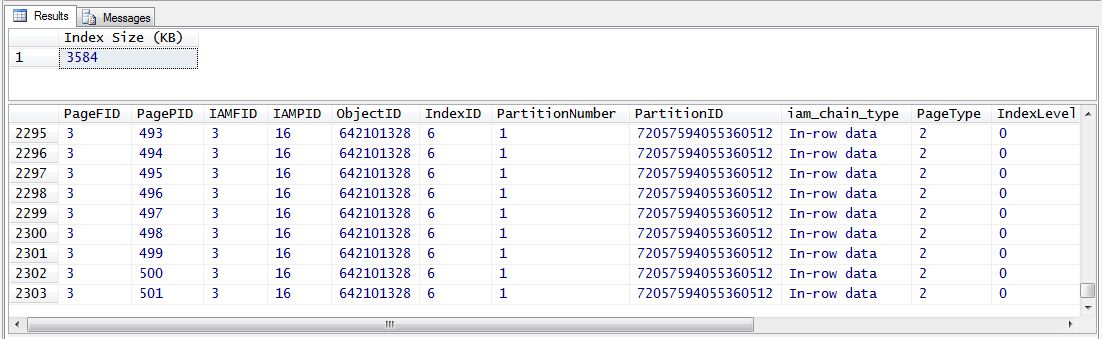
The Sales1 file has about 3.6 MB of used space and the table and indexes together require just over 2300 pages. Next I disabled the index and then re-ran the previous statements:
alter index IX_SalesOrderDetail_CTN_PID on Sales.SalesOrderDetail disable;

select (FILEPROPERTY ('Sales1','SpaceUsed') * 8) as "Index Size (KB)";

DBCC IND (Adventureworks, 'Sales.SalesOrderDetail',-1);
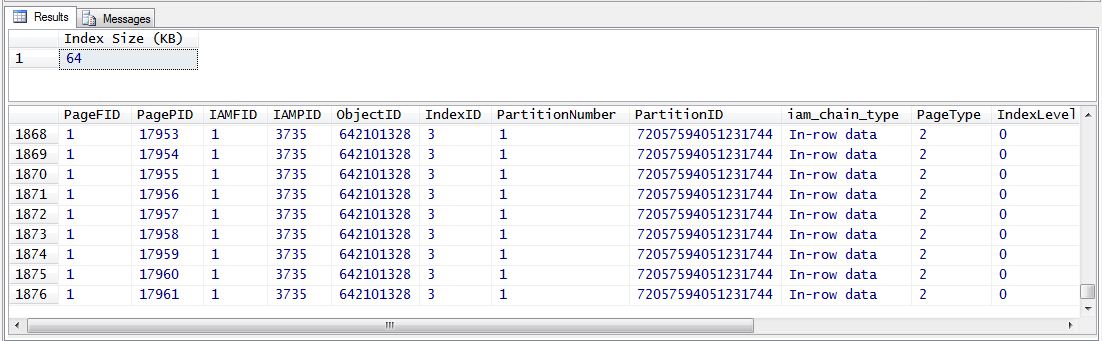
We can see that the amount of used space in the file has dropped to 64 KB, and the number of pages used by the table and indexes drops to under 1900. Excellent – SQL Server has unassigned the index pages and that’s reflected in our output. To re-enable the index I rebuilt it, and if you run the FILEPROPERTY and DBCC IND statements again, the size of the file and number of pages increase.
alter index IX_SalesOrderDetail_CTN_PID on Sales.SalesOrderDetail rebuild;
Note: I admit, I initially tried to use the sys.dm_db_index_physical_stats DMV to view the pages assigned to the index, but that DMV is not usable for a disabled index.
Cleanup code:
create nonclustered index IX_SalesOrderDetail_CTN_PID on Sales.SalesOrderDetail
(
CarrierTrackingNumber asc
)
with (
PAD_INDEX = OFF,
STATISTICS_NORECOMPUTE = OFF,
SORT_IN_TEMPDB = ON,
IGNORE_DUP_KEY = OFF,
DROP_EXISTING = ON,
ONLINE = OFF,
ALLOW_ROW_LOCKS = ON,
ALLOW_PAGE_LOCKS = ON
)
on [PRIMARY];

alter database AdventureWorks remove file Sales1;

alter database AdventureWorks remove filegroup Sales;

