
Every so often we hear from a customer who gets a variation of this message when trying to upgrade their database to a newer version of our application:
Msg 5074, Level 16, State 1, Line 1
The statistics ‘my_stats’ is dependent on column ‘column1’.
Msg 4922, Level 16, State 9, Line 1
ALTER TABLE ALTER COLUMN name failed because one or more objects access this column.
The issue is that the customer has created statistics manually on a column we are trying to alter as part of the upgrade process. This does not happen for statistics that were auto-created by the optimizer, as the engine drops those behind the scenes if you alter the column.
The first question I ask is “Who added the statistic and why?” Now, customers are permitted to create statistics manually if it will provide benefit, so no one is in violation of any agreement. But if there is a performance issue that a customer encountered and fixed independently, I want to know about it. It is possible that the problem is unique to their environment. But it is also possible they are the first customer to encounter it, and other customers will, and we need to be proactive about it.
The funny thing is that the customer inevitably states that they have no idea how the statistics came to exist. I know that *someone* must have created those statistics…but it usually remains an unsolved mystery.
In the end we provide a query to list all user-created statistics in the database, tell the customer to drop the statistic(s), and then they can recreate them after the upgrade. This gets a little tricky because I do not know from memory what columns, if any, might be altered as part of an upgrade. In addition, you do not have to drop user created statistics for every column that is altered. For example, you can have statistics on a varchar column and increase the length without dropping user created statistics. This is explained in more detail in the BOL entry for ALTER TABLE.
The code below steps through a demo of the issue I described, including a variation of the query to list user created statistics.
First create a table in one of your sandbox databases and add a clustered index:
CREATE TABLE dbo.titles (
name CHAR (500),
releaseyear SMALLDATETIME,
rating VARCHAR(5)
);

CREATE CLUSTERED INDEX CI_ReleaseYear ON dbo.titles (releaseyear);
Add some data…
INSERT INTO dbo.titles (
name, releaseyear, rating
)
VALUES
('The Hangover', '2009-06-05 00:00:00', 'R'),
('The Hunt for Red October', '1990-03-02 00:00:00', 'PG'),
('Apollo 13', '1995-06-30 00:00:00', 'PG'),
('A Few Good Men', '1994-12-11 00:00:00', 'R'),
('The Natural', '1984-05-11 00:00:00', 'PG'),
('IronMan', '2008-05-02 00:00:00', 'PG-13'),
('The Incredibles', '2004-11-05 00:00:00', 'PG'),
('Apollo 13', '1995-06-30 00:00:00', 'PG'),
('The Truman Show', '1998-06-05 00:00:00', 'PG-13'),
('All The President''s Men', '1976-04-09 00:00:00', 'R');
Now let’s take a look to see what statistics currently exist:
sp_helpstats N'dbo.Titles', 'ALL'
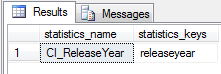
Great, we can see that we have one statistic for our clustered index.
Just for fun, we will force the optimizer to create statistics on a column for us, after we verify that AutoCreate Statistics is enabled:
/* verify auto-update statistics is enabled */
SELECT
CASE
WHEN is_auto_create_stats_on = 0 THEN 'Auto Create Stats Disabled'
WHEN is_auto_create_stats_on = 1 THEN 'Auto Create Stats Enabled'
END
FROM sys.databases
WHERE database_id = DB_ID()

/* query to invoke creation of stats on rating column */
SELECT name, rating FROM dbo.titles WHERE rating = 'PG'
GO

/* verify new column statistic was created */
sp_helpstats N'dbo.Titles', 'ALL'
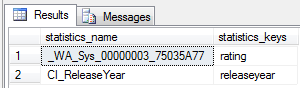
Note that statistics that start with _WA are ones created for you by the optimizer. If you really want to know how the statistic name is derived, check out Paul Randal’s post that explains it. All right, now we need to create a statistic manually:
CREATE STATISTICS us_name ON dbo.Titles (name) WITH FULLSCAN

GO

sp_helpstats N'dbo.Titles', 'ALL'
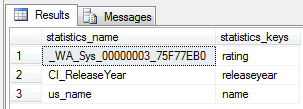
Success, we can see that it exists. Note, I use “us” as a prefix to denote user statistic, and I tend to always capture a 100% sample.
Now we are ready to alter our table…
ALTER TABLE dbo.Titles ALTER COLUMN name char (1000);
…and we get the lovely message:

Duly noted. At this point I like to check to see what user statistics exist in the entire database. For SQL Server 2005 onward, this is pretty easy:
SELECT st.name AS TableName, ss.name AS StatisticName
FROM sys.stats ss
JOIN sys.tables st ON ss.object_id=st.object_id
WHERE ss.user_created = 1
ORDER BY st.name, ss.name;
Now I have some information, which is a good starting point, but as I said earlier I probably don’t need to drop every statistic. In this case, I need to drop it because I am modifying a column of char data type. It would be useful to see the data type of the column…
SELECT st.name AS TableName, ss.name AS StatisticName,
sc.name AS ColumnName,
t.name AS DataType,
CASE
when sc.max_length = -1 then 'varchar(max), nvarchar(max), varbinary(max) or xml'
else CAST(sc.max_length AS varchar(10))
END AS ColumnLength
FROM sys.stats ss
JOIN sys.tables st ON ss.object_id=st.object_id
JOIN sys.stats_columns ssc ON ss.stats_id=ssc.stats_id and st.object_id=ssc.object_id
JOIN sys.columns sc ON ssc.column_id=sc.column_id and st.object_id=sc.object_id
JOIN sys.types t ON sc.system_type_id=t.system_type_id
WHERE ss.user_created = 1
ORDER BY t.name, st.name;
Now I have a better idea of what I might have to drop and then recreate after the ALTER completes. For our example, we can drop the statistic, and then successfully alter the column:
DROP STATISTICS dbo.Titles.us_name;

ALTER TABLE dbo.Titles ALTER COLUMN name char (2000);
Again, if this column were a varchar, we would not encounter the same issue (feel free to modify the data type for the name column and run through the script again). Also, finding the user created statistics in SQL 2000 is not as easy. When I ran into this issue for a customer running SQL 2000, Jonathan Kehayias ( blog | @SQLPoolBoy ) and Amit Banerjee ( blog | @banerjeeamit ) provided options for how to get the information, and I ended up using the query below:
select
so.name as TableName,
si.name as StatisticName
from sysindexes si
join sysobjects so on si.id = so.id
where si.status&0x40 = 0x40 and si.status&0x800000=0
Since we still have a fair number of customers running SQL 2000, this will come in handy. Thanks guys!

