
I don’t know about you, but when I am creating a presentation in PowerPoint, I use the notes section. Sometimes I write full sentences about what I want to say, sometimes I just include a link to a whitepaper or blog post. If I’m rehearsing I might put a To Do item for the slide in there, or maybe just phrases which are points I want to hit. At the end of the day, after I’ve given the presentation and I’m preparing to upload it for distribution, I remember that I don’t want those comments in the final copy. Historically I have opened the .ppt file, saved a new copy, then gone through and removed the text from the notes section of every slide. I might be the only person who does this. But in case I’m not, let me tell you about the new trick I learned from a co-worker…
Open up a .ppt file and go to File | Check for Issues | Inspect Document (I’m doing this in Office 2010, I know it also works in Office 2007). The Document Inspector window will open (below) and voilà, you can inspect the Presentation Notes.
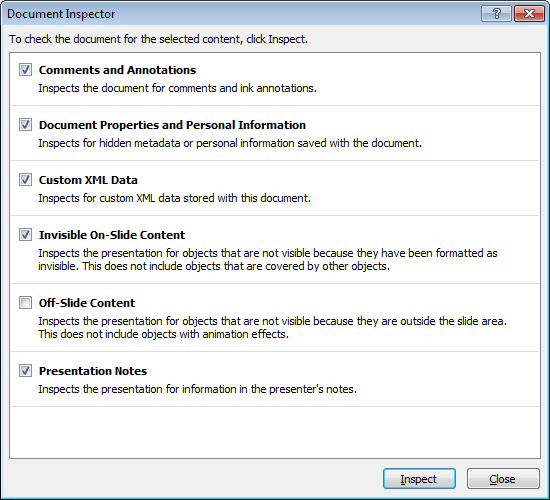
Document Inspector Gadget
Now, you can also look for comments, check for hidden metadata, you can even look for XML! I don’t want XML in my database, I certainly don’t want it in my PowerPoint. But anyway, check or un-check whatever options you like, but leave Presentation Notes checked and then select Inspect. If it finds any text in the notes section it will tell you, and then you have the option to Remove All. Just like that. No more highlight and delete for me!
The only drawback I have found is the instance where I have included links in the notes that are relevant to the content. But perhaps I should get with 2011 and start including those links in the slide. Hope this helps!

